


DOCX Editor is a complete document ecosystem featuring a WYSIWYG editor with real-time collaboration, tracked changes, and rich editing capabilities, a headless layout engine that runs on both client and server, and a PDF generation engine. Together, they provide a unified foundation for document editing, rendering, and export.
Live demo | Documentation | Roadmap
Install the adapter for your framework and its required engine peer:
npm install @docx-editor.dev/react @docx-editor.dev/core   # React
npm install @docx-editor.dev/vue @docx-editor.dev/core     # Vue
See the React or Vue quick start.
For Node.js, use ^20.16.0 || >=22.3.0. Browser applications can use the packages with their build tool.
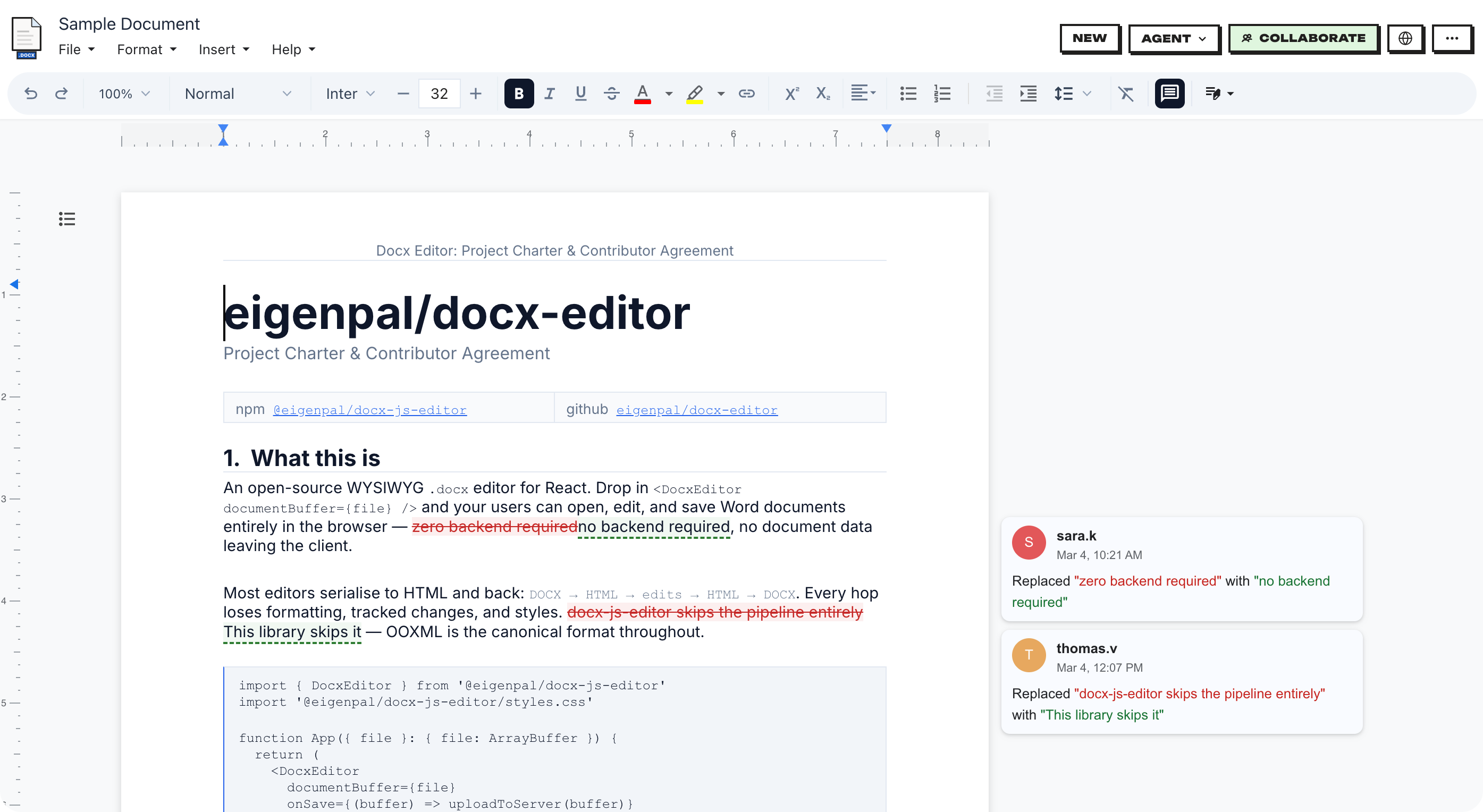
| Feature | Description |
|---|---|
| Editor API | Automate documents in a browser or server with a supported subset of Word Office.js. |
| Review workflow | Add comments and tracked changes with the review module. |
| Word fidelity | Check rendering and editing support for document features. |
| Save and reopen | Preserve document structure, unsupported OOXML, and embedded files. |
| Collaboration | Edit together with remote cursors, shared changes, and personal undo. |
| Custom UI | Build controls with shared commands, components, and styles. |
| React and Vue | Use either adapter with the same document engine. |
| Translations | Translate editor controls with locale catalogs and custom strings. |
| PDF export | Convert DOCX to PDF on a Node.js server. |
| Markdown export | Convert DOCX to Markdown with page references and images. |
| Telemetry | Send anonymous diagnostics and metrics to Sentry, OpenTelemetry, Prometheus, or a log service. No document content or personal data is sent. |
Review, collaboration, the Editor API, PDF export, and telemetry require separate packages under the EigenPal Pro License.
| Package | Description | Docs |
|---|---|---|
@docx-editor.dev/react |
React editor components and hooks. | React adapter |
@docx-editor.dev/vue |
Vue 3 editor components and composables. | Vue adapter |
@docx-editor.dev/core |
DOCX parsing, editing, and rendering. | Core engine |
@docx-editor.dev/i18n |
Translations and locale types. | Translations |
@docx-editor.dev/fonts |
Open-licensed substitutes for Word fonts. | Fonts and measurement |
@docx-editor.dev/docx-to-markdown |
Convert DOCX to Markdown with page and image output. | Markdown export |
@docx-editor.dev/docx-to-pdf |
Convert DOCX to PDF on Node.js. | PDF export |
@docx-editor.dev/fonts-cjk |
Optional Chinese, Japanese, and Korean font for PDF export. | CJK font setup |
@docx-editor.dev/pro |
Tracked changes, comments, collaboration, and custom nodes. | Review and collaboration |
@docx-editor.dev/editor-api |
A supported subset of Word Office.js for browser and server editing. | Document automation |
@docx-editor.dev/telemetry |
Anonymous diagnostics, metrics, and error reporting for editors and collaboration servers. | Telemetry |
@docx-editor.dev/editor-api, @docx-editor.dev/pro, @docx-editor.dev/docx-to-pdf, and @docx-editor.dev/telemetry use the EigenPal Pro License. See the license terms for editor-api, pro, docx-to-pdf, and telemetry. Compare license and support options on the pricing page.
Import the stylesheet once and pass the selected file to the editor:
import { useState } from 'react';
import { DocxEditor } from '@docx-editor.dev/react';
import '@docx-editor.dev/core/styles/editor.css';

export function App() {
  const [doc, setDoc] = useState<Uint8Array>();

  return (
    <div style={{ height: '100vh', display: 'flex', flexDirection: 'column' }}>
      <input
        type="file"
        accept=".docx"
        onChange={async (e) => {
          const file = e.target.files?.[0];
          setDoc(file ? new Uint8Array(await file.arrayBuffer()) : undefined);
        }}
      />
      <div style={{ flex: 1, minHeight: 0 }}>
        {doc && <DocxEditor document={doc} mode="edit" />}
      </div>
    </div>
  );
}
For Next.js and server-side rendering (SSR), use dynamic(..., { ssr: false }) in a Client Component. The editor requires browser APIs.
Full docs: React adapter · Props and ref methods.
Import the stylesheet once and pass the selected file to the editor:
<script setup lang="ts">
import { ref } from 'vue';
import { DocxEditor } from '@docx-editor.dev/vue';
import '@docx-editor.dev/vue/styles.css';

const doc = ref<Uint8Array>();

async function onPick(event: Event) {
  const file = (event.target as HTMLInputElement).files?.[0];
  doc.value = file ? new Uint8Array(await file.arrayBuffer()) : undefined;
}
</script>

<template>
  <div style="height: 100vh; display: flex; flex-direction: column">
    <input type="file" accept=".docx" @change="onPick" />
    <div style="flex: 1; min-height: 0">
      <DocxEditor v-if="doc" :document="doc" mode="edit" />
    </div>
  </div>
</template>
For Nuxt and server-side rendering, load the editor in a client-only component. The editor requires browser APIs.
Full docs: Vue adapter · Props and ref methods.
Pass usable font bytes to measure text for line and page breaks. Fallback measurement can change wrapping and pagination.
Use packagedFonts() from @docx-editor.dev/fonts for packaged substitutes. Use customFonts() from @docx-editor.dev/core/editor for your own font files. Add googleFonts() when your application accepts third-party font requests.
Use the toolchain in Contributing, then run these commands from the repository root:
bun install
bun run dev          # localhost:5173
bun run dev:markdown # Markdown demo: localhost:5177
bun run build
bun run typecheck
Try unreleased changes in the preview of main.
Examples: Vite | DOCX to Markdown | DOCX to PDF | Next.js | Remix | Astro | Vue | Collaboration | Server agent review | Document refresh | Telemetry | Collaboration telemetry
Documentation | React props and ref methods | Vue props and ref methods
See Contributing for setup, tests, and the Contributor License Agreement (CLA).
| Locale | Language |
|---|---|
en |
English |
de |
German |
es |
Spanish |
fr |
French |
he |
Hebrew |
hi |
Hindi |
id |
Indonesian |
ja |
Japanese |
pl |
Polish |
pt-BR |
Portuguese (Brazil) |
tr |
Turkish |
zh-CN |
Chinese (Simplified) |
To add a locale, see the i18n contribution guide.
bun run i18n:new it      # Scaffold an Italian locale.
bun run i18n:status # check translation coverageThe repository uses Apache 2.0, except for the Pro packages. These packages use the EigenPal Pro License:
@docx-editor.dev/pro: tracked changes, comments, collaboration, and custom nodes.@docx-editor.dev/editor-api: document automation in a browser or on a server.@docx-editor.dev/docx-to-pdf: PDF export on Node.js.@docx-editor.dev/telemetry: anonymous diagnostics, metrics, and error reporting.
Production use of a Pro package requires a commercial agreement. Compare options on the pricing page. Bundled fonts retain their own licenses.
For commercial support or custom features, email the support team.
See the public roadmap for planned work and priorities.